---
title: Network/Cabling Diagrams Explained
description: Learn about network/cabling diagrams explained for your Impos POS system. Get troubleshooting tips and step-by-step guidance.
---
[Skip to content](https://knowledge.impos.com.au/hc/en-us/articles/360002704456-network-cabling-diagrams-explained#main-content)
English - Australia
Show submenu for translations
[More support](https://knowledge.impos.com.au/kb-tickets/new?hsLang=en-au)
[](https://impos.com.au)
Open main navigation
Close main navigation
- English - Australia
Show submenu for translations
- [More support](https://knowledge.impos.com.au/kb-tickets/new)
- [visit impos.com.au](https://impos.com.au/)
[visit impos.com.au](https://impos.com.au/)
How can we help you?
- There are no suggestions because the search field is empty.
1. [Impos Knowledge Base](https://knowledge.impos.com.au/?hsLang=en-au)
2. [FAQs](https://knowledge.impos.com.au/faqs?hsLang=en-au)
3. [FAQs - Onboarding, Installation and Training](https://knowledge.impos.com.au/faqs?hsLang=en-au#faqs-onboarding-installation-and-training)
13 May 2026
# Network/Cabling Diagrams Explained
## Network Diagrams let you know all the connections you need to be able to have your system run with connections to power, hardware and networks.
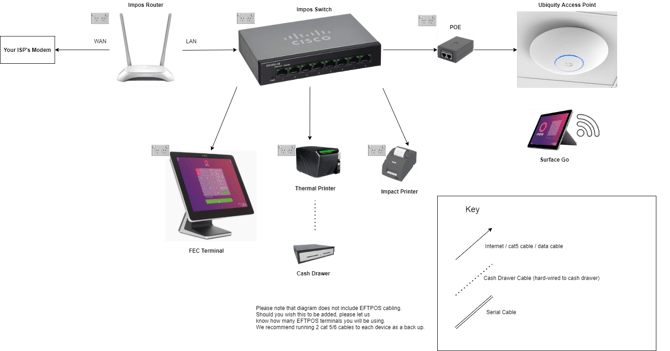
Your Network Diagram is one of the most important pieces of information that you will be provided when you sign up to Impos. It details the network requirements for your Impos system. (To see why getting your networking right is so important, please see [this article](https://learn.impos.com.au/hc/en-us/articles/360002732075-What-is-Data-Cabling-and-Why-Do-I-Need-It-?hsLang=en-au).)
In this article, we'll show you an example Network Diagram, and explain what each of the parts are.
*Example Network Diagram*
**Impos Hardware**
*Impos Router*
This is the router used exclusively by Impos hardware, to create a closed network for your POS. It is connected via cable to your *ISP Modem*. The cable to the *ISP Modem* is plugged into the WAN port, and all other devices to one of the four LAN ports.
*Impos Switch*
This is the device to which all your Impos hardware will be connected. Think of it like a hub. It is also connected to the *Impos Router* via cable. There are eight ports, and any of them can be used for any device.
*Terminals*
These are your static touch-screen POS terminals. They are connected to the *Impos Switch* either directly or via a network/patch point. (A network/patch point is the terminal point of a cable that runs behind a wall, under a floor, through your ceiling etc. It terminates at two ends - one near your S*witch*, and one near where the POS hardware is installed.)
*Printers*
There are two main types of printers - *Thermal* and *Impact*. As a general rule, Thermal printers are used for receipts and production dockets in non-kitchen areas, and Impact printers are used in kitchens and hot spaces. Both types of printers connect to your *Impos Switch* either directly or via a network/patch point.
*Ubiquity Access Point*
This is a wifi extender for your *Impos Router*, specifically so that your *Impos Tablets* have a strong wifi connection throughout your venue. These are usually located on a ceiling or wall, and connected by cable via a *POE* box to your *Impos Switch*.
*POE (Power Over* *Ethernet)*
The POE is a small box that connects via cable to the *Ubiquity Access Point* at one end, and your *Impos Switch* at the other. It requires a power connection and provides electricity to the *Ubiquity Access Point*.
*Impos Tablets*
Usually a Microsoft Surface Go or Windows tablet, this is a wireless POS that can be moved around the venue. It requires a power connection to charge when the battery is low, and is connected via wifi to the network.
*Cash Drawers*
These are connected via a hard-wired cable to a printer (preferred) or a terminal. They are not network devices.
**Other Hardware**
*ISP Modem*
This is the modem provided to you by your ISP (Internet Service Provider) that gives your venue internet access. It is strongly recommended to connect your Impos network to the internet, however the Impos network does not need the internet to function. The exception to this is that you will require internet for any integrated services or if you wish to view reports from anywhere other than your venue. Additionally if you require technical support, having an internet connection makes it much quicker and easier for our Support team to help you.
**Cables**
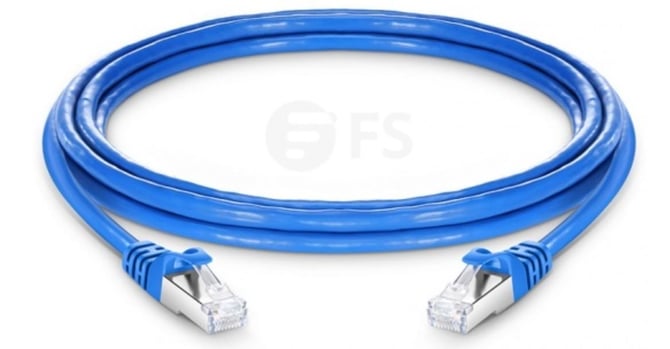
*Cat5/Cat6*
These are standard network cables that are used to connect the devices in your venue. They are also the cables that your electrician will install as part of your network. They are usually blue or yellow (although they can be any colour).
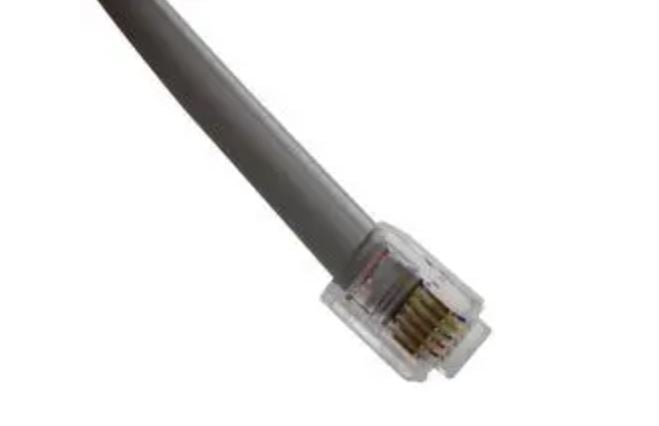
*Cash Drawer Cable*
This cable is hardwired to the cash drawer, and connected to a printer or terminal. This does not carry any network information.
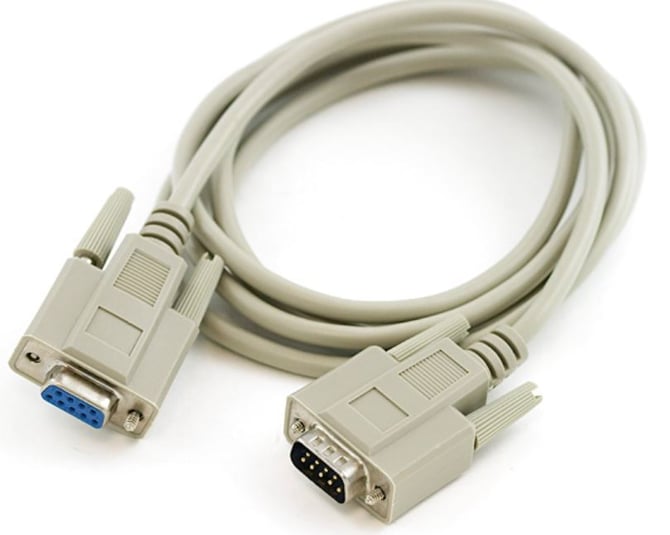
*Serial Cable*
This is a basic cable that connects a terminal to a printer. Older printers may still connect via serial cable, but all new equipment should be connected to the network directly.
If you have any further questions, please contact our team on 1300 780 268.
- [How to Connect to your Venue Remotely](https://knowledge.impos.com.au/how-to-connect-to-your-venue-remotely?hsLang=en-au#main-content)
- [How to Connect to your Venue Remotely](https://knowledge.impos.com.au/how-to-connect-to-your-venue-remotely?hsLang=en-au#how-to-connect-to-your-venue-remotely)
- [Impos Back Office and Stock](https://knowledge.impos.com.au/impos-back-office-and-stock?hsLang=en-au#main-content)
- [Stock](https://knowledge.impos.com.au/impos-back-office-and-stock?hsLang=en-au#stock)
- [Back Office](https://knowledge.impos.com.au/impos-back-office-and-stock?hsLang=en-au#back-office)
- [Impos Front Office](https://knowledge.impos.com.au/impos-front-office?hsLang=en-au#main-content)
- [Cashier Reports](https://knowledge.impos.com.au/impos-front-office?hsLang=en-au#cashier-reports)
- [Getting Started with Impos Front Office](https://knowledge.impos.com.au/impos-front-office?hsLang=en-au#getting-started-with-impos-front-office)
- [Order Information](https://knowledge.impos.com.au/impos-front-office?hsLang=en-au#order-information)
- [Table Service](https://knowledge.impos.com.au/impos-front-office?hsLang=en-au#table-service)
- [Storing Order information in Front Office](https://knowledge.impos.com.au/impos-front-office?hsLang=en-au#storing-order-information-in-front-office)
- [Taking Payment](https://knowledge.impos.com.au/impos-front-office?hsLang=en-au#taking-payment)
- [Web Reports](https://knowledge.impos.com.au/impos-front-office?hsLang=en-au#web-reports)
- [More Functions](https://knowledge.impos.com.au/impos-front-office?hsLang=en-au#more-functions)
- [Impos Analytics](https://knowledge.impos.com.au/impos-analytics?hsLang=en-au#main-content)
- [Impos Analytics](https://knowledge.impos.com.au/impos-analytics?hsLang=en-au#impos-analytics)
- [Integrations](https://knowledge.impos.com.au/integrations?hsLang=en-au#main-content)
- [Doshii](https://knowledge.impos.com.au/integrations?hsLang=en-au#doshii)
- [Kitchen & Inventory Management](https://knowledge.impos.com.au/integrations?hsLang=en-au#kitchen-inventory-management)
- [Reservations & Room Charge](https://knowledge.impos.com.au/integrations?hsLang=en-au#reservations-room-charge)
- [Deputy Rostering](https://knowledge.impos.com.au/integrations?hsLang=en-au#deputy-rostering)
- [Promotions & Membership](https://knowledge.impos.com.au/integrations?hsLang=en-au#promotions-membership)
- [Bump Screens](https://knowledge.impos.com.au/integrations?hsLang=en-au#bump-screens)
- [Accounting](https://knowledge.impos.com.au/integrations?hsLang=en-au#accounting)
- [EFTPOS](https://knowledge.impos.com.au/integrations?hsLang=en-au#eftpos)
- [Cinch](https://knowledge.impos.com.au/cinch?hsLang=en-au#main-content)
- [Cinch Web Publishing](https://knowledge.impos.com.au/cinch?hsLang=en-au#cinch-web-publishing)
- [Cinch Basics](https://knowledge.impos.com.au/cinch?hsLang=en-au#cinch-basics)
- [Kiosk](https://knowledge.impos.com.au/kiosk?hsLang=en-au#main-content)
- [Setting Up Kiosk](https://knowledge.impos.com.au/kiosk?hsLang=en-au#setting-up-kiosk)
- [Latest Updates](https://knowledge.impos.com.au/latest-updates?hsLang=en-au#main-content)
- [Release Notes](https://knowledge.impos.com.au/latest-updates?hsLang=en-au#release-notes)
- [Policy Updates](https://knowledge.impos.com.au/latest-updates?hsLang=en-au#policy-updates)
- [FAQs](https://knowledge.impos.com.au/faqs?hsLang=en-au#main-content)
- [FAQs - Front Office](https://knowledge.impos.com.au/faqs?hsLang=en-au#faqs-front-office)
- [FAQs - Back Office](https://knowledge.impos.com.au/faqs?hsLang=en-au#faqs-back-office)
- [FAQs - Hardware eg Printers, Terminals, Tablets, Networking](https://knowledge.impos.com.au/faqs?hsLang=en-au#faqs-hardware-eg-printers-terminals-tablets-networking)
- [FAQs - Onboarding, Installation and Training](https://knowledge.impos.com.au/faqs?hsLang=en-au#faqs-onboarding-installation-and-training)
- [FAQs - Stock](https://knowledge.impos.com.au/faqs?hsLang=en-au#faqs-stock)
- [FAQs - Schools](https://knowledge.impos.com.au/faqs?hsLang=en-au#faqs-schools)
- [Troubleshooting](https://knowledge.impos.com.au/troubleshooting?hsLang=en-au)
[](https://impos.com.au/)
[mailto:email@email.com](mailto:email@email.com)
Copyright © 2026, Impos