---
title: Touring the Default Impos Analytics Dashboards
description: Learn how to touring the default impos analytics dashboards in Impos Analytics. Get the most from your POS data with powerful reporting tools.
---
[Skip to content](https://knowledge.impos.com.au/hc/en-us/articles/211374868-touring-the-default-impos-analytics-dashboards#main-content)
English - Australia
Show submenu for translations
[More support](https://knowledge.impos.com.au/kb-tickets/new?hsLang=en-au)
[](https://impos.com.au)
Open main navigation
Close main navigation
- English - Australia
Show submenu for translations
- [More support](https://knowledge.impos.com.au/kb-tickets/new)
- [visit impos.com.au](https://impos.com.au/)
[visit impos.com.au](https://impos.com.au/)
How can we help you?
- There are no suggestions because the search field is empty.
1. [Impos Knowledge Base](https://knowledge.impos.com.au/?hsLang=en-au)
2. [Impos Analytics](https://knowledge.impos.com.au/impos-analytics?hsLang=en-au)
3. [Impos Analytics](https://knowledge.impos.com.au/impos-analytics?hsLang=en-au#impos-analytics)
28 July 2026
# Touring the Default Impos Analytics Dashboards
## Once you are set up with Impos Analytics by the Impos Tech team, you'll have access to three dashboards with a range of reports within them
### **Sales** - [Click Here](https://reports.impos.com.au/RunDashboard.i4?dashUUID=d3fa898d-aade-4668-94e2-b769ab1c856e&)
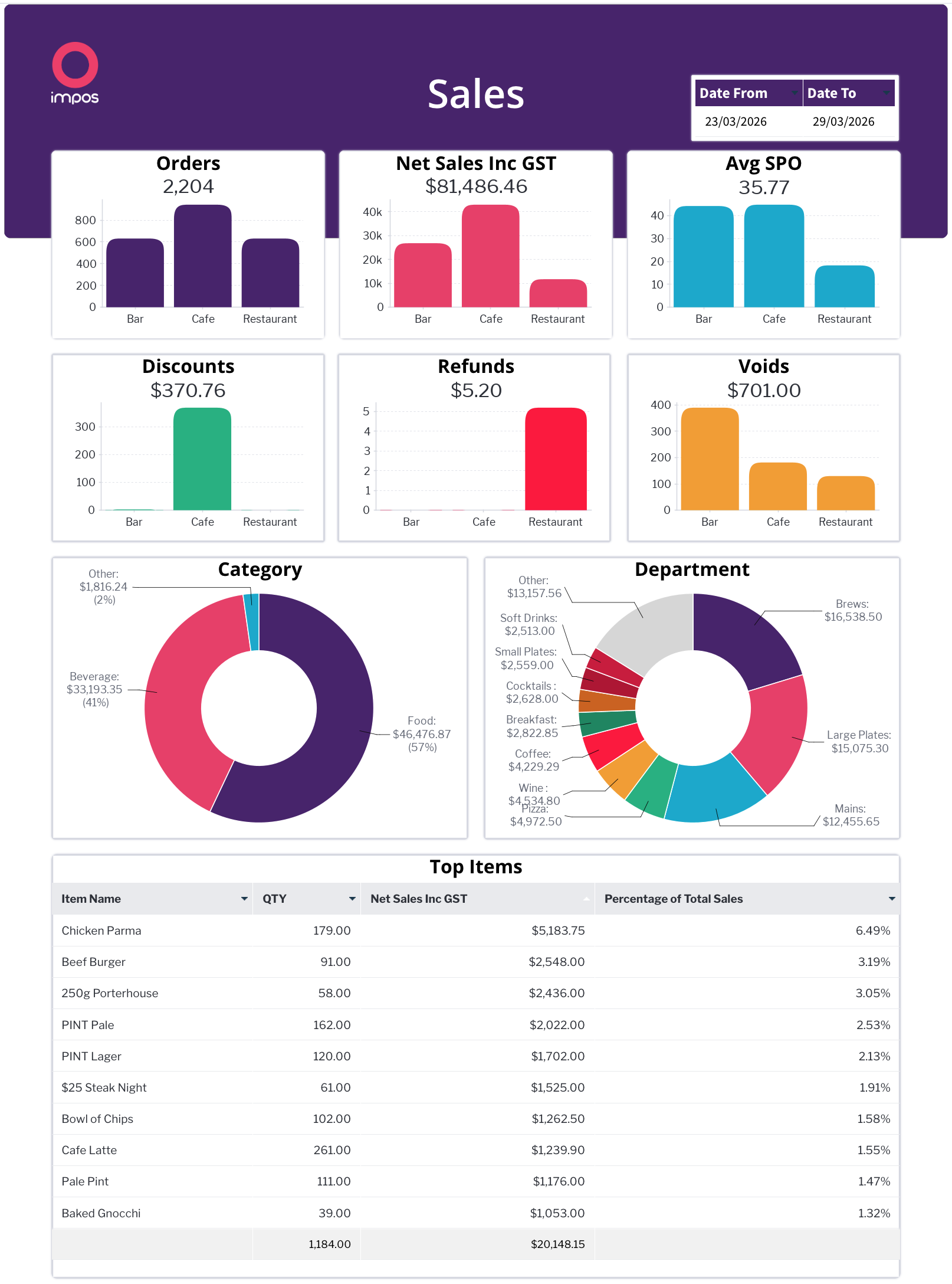
Focuses on sales performance for a selected date range. Key metrics at the top include total **Orders**, **Net** **Sales Inc GST**, and Average Spend Per Order (**Avg SPO**), followed by **Discounts**, **Refunds**, and **Voids**. Two donut charts break down sales by **Category** and **Department**. At the bottom, a **Top Items** table lists individual products ranked by revenue generated and percentage of total sales.
### **Overview** - [Click Here](https://reports.impos.com.au/RunDashboard.i4?dashUUID=ed3bc737-3f42-4cf8-89ac-9b1cafc87fe5&)
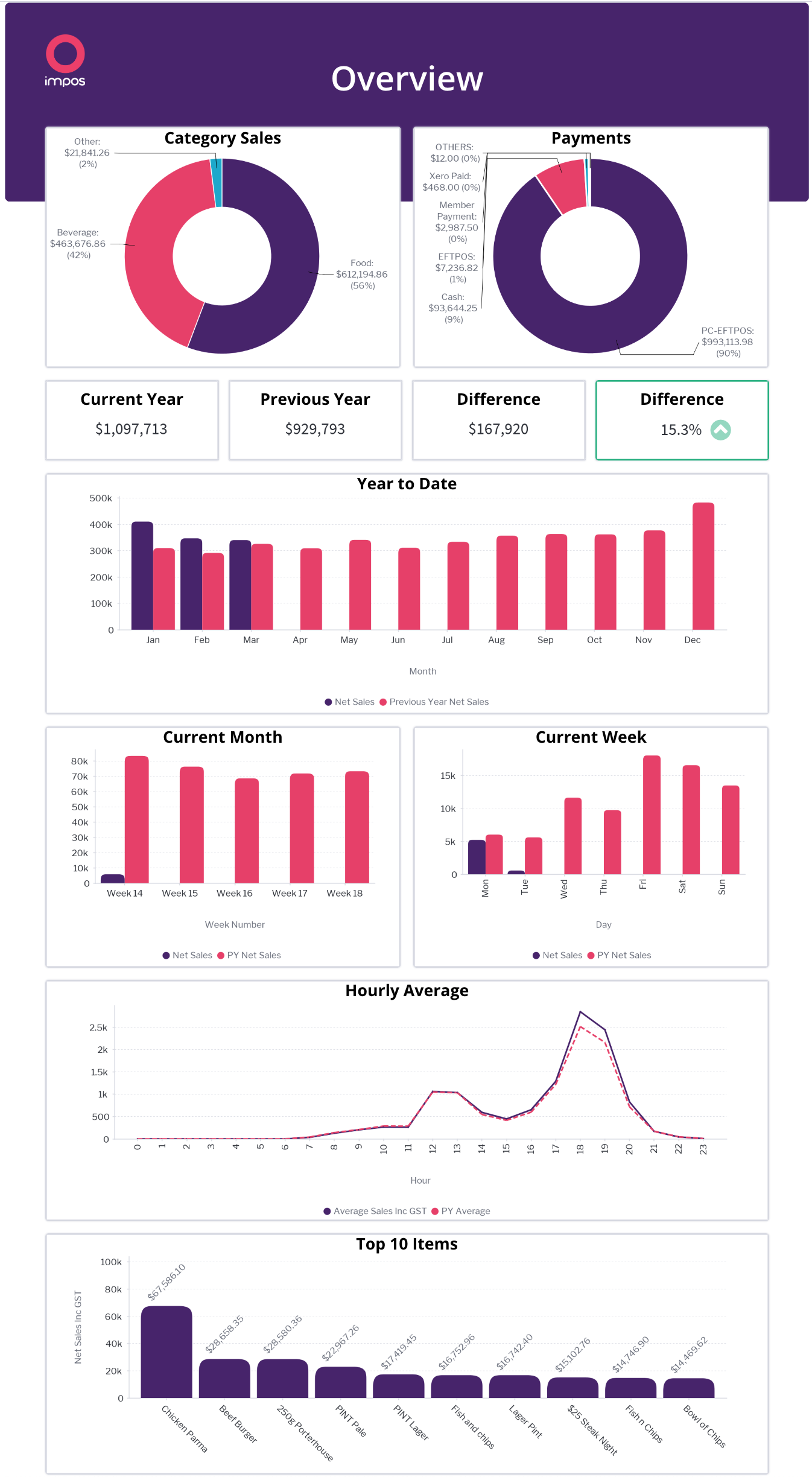
A high-level performance comparison dashboard. The top section provides a total for the **Sales** and **Payments**, followed by a comparison of the **Current Year vs Previous Year** figures. Below that, a **Year to Date** bar chart visualises monthly performance across both years side by side. Further down are **Current Month** and **Current Week** bar charts for shorter-term views, a **Hourly Average** trend line, and a **Top 10 Items** table summarising best-performing products.
### **Payments** - [Click Here](https://reports.impos.com.au/RunDashboard.i4?dashUUID=84e0ddff-45d9-41f4-987c-306d4c5d1d3c&)
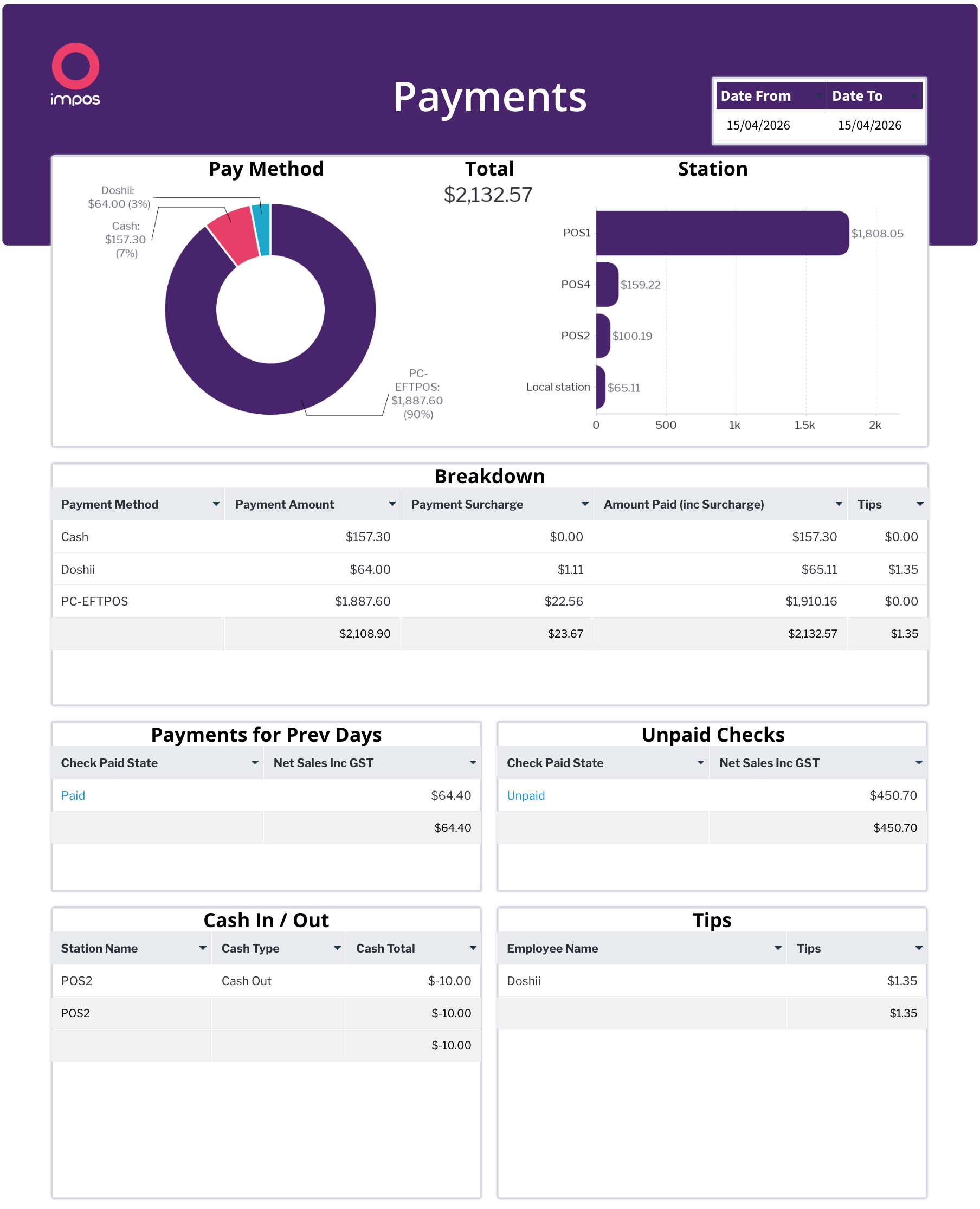
Provides a financial breakdown of how payments were received. Shows total revenue with a by **Pay Method** donut chart and a by **Station** Bar Chart. The **Breakdown** table details each payment method with columns for payment amount, cancellations, fees/surcharges, and tips. Additional sections cover **Payments for Prev Days** (outstanding carry-over payments), **Unpaid Checks**, **Cash In / Out**, and **Tips**.
### **Rearranging Dashboards**
To change the order of the dashboards, press the drop down button and then Move.
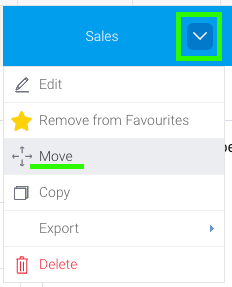
From there, you can re-order the dashboards and press 'Apply'.
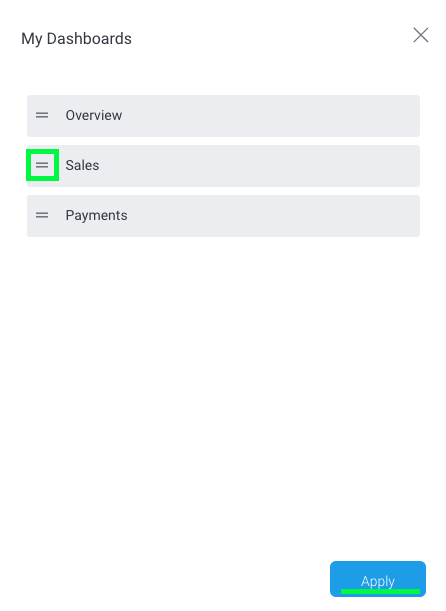
The one that the top of the list will be what shows up when you first log in.
### **Removing Dashboards**
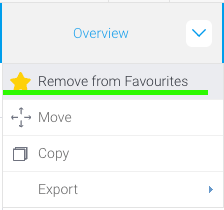
To remove a dashboard, press the drop down button next to it, and press 'Remove from Favourites'. Dashbaords that have been removed can be found again in the browse tab if you later wish to re-add them.
- [How to Connect to your Venue Remotely](https://knowledge.impos.com.au/how-to-connect-to-your-venue-remotely?hsLang=en-au#main-content)
- [How to Connect to your Venue Remotely](https://knowledge.impos.com.au/how-to-connect-to-your-venue-remotely?hsLang=en-au#how-to-connect-to-your-venue-remotely)
- [Impos Back Office and Stock](https://knowledge.impos.com.au/impos-back-office-and-stock?hsLang=en-au#main-content)
- [Stock](https://knowledge.impos.com.au/impos-back-office-and-stock?hsLang=en-au#stock)
- [Back Office](https://knowledge.impos.com.au/impos-back-office-and-stock?hsLang=en-au#back-office)
- [Impos Front Office](https://knowledge.impos.com.au/impos-front-office?hsLang=en-au#main-content)
- [Cashier Reports](https://knowledge.impos.com.au/impos-front-office?hsLang=en-au#cashier-reports)
- [Getting Started with Impos Front Office](https://knowledge.impos.com.au/impos-front-office?hsLang=en-au#getting-started-with-impos-front-office)
- [Order Information](https://knowledge.impos.com.au/impos-front-office?hsLang=en-au#order-information)
- [Table Service](https://knowledge.impos.com.au/impos-front-office?hsLang=en-au#table-service)
- [Storing Order information in Front Office](https://knowledge.impos.com.au/impos-front-office?hsLang=en-au#storing-order-information-in-front-office)
- [Taking Payment](https://knowledge.impos.com.au/impos-front-office?hsLang=en-au#taking-payment)
- [Web Reports](https://knowledge.impos.com.au/impos-front-office?hsLang=en-au#web-reports)
- [More Functions](https://knowledge.impos.com.au/impos-front-office?hsLang=en-au#more-functions)
- [Impos Analytics](https://knowledge.impos.com.au/impos-analytics?hsLang=en-au#main-content)
- [Impos Analytics](https://knowledge.impos.com.au/impos-analytics?hsLang=en-au#impos-analytics)
- [Integrations](https://knowledge.impos.com.au/integrations?hsLang=en-au#main-content)
- [Doshii](https://knowledge.impos.com.au/integrations?hsLang=en-au#doshii)
- [Kitchen & Inventory Management](https://knowledge.impos.com.au/integrations?hsLang=en-au#kitchen-inventory-management)
- [Reservations & Room Charge](https://knowledge.impos.com.au/integrations?hsLang=en-au#reservations-room-charge)
- [Deputy Rostering](https://knowledge.impos.com.au/integrations?hsLang=en-au#deputy-rostering)
- [Promotions & Membership](https://knowledge.impos.com.au/integrations?hsLang=en-au#promotions-membership)
- [Bump Screens](https://knowledge.impos.com.au/integrations?hsLang=en-au#bump-screens)
- [Accounting](https://knowledge.impos.com.au/integrations?hsLang=en-au#accounting)
- [EFTPOS](https://knowledge.impos.com.au/integrations?hsLang=en-au#eftpos)
- [Cinch](https://knowledge.impos.com.au/cinch?hsLang=en-au#main-content)
- [Cinch Web Publishing](https://knowledge.impos.com.au/cinch?hsLang=en-au#cinch-web-publishing)
- [Cinch Basics](https://knowledge.impos.com.au/cinch?hsLang=en-au#cinch-basics)
- [Kiosk](https://knowledge.impos.com.au/kiosk?hsLang=en-au#main-content)
- [Setting Up Kiosk](https://knowledge.impos.com.au/kiosk?hsLang=en-au#setting-up-kiosk)
- [Latest Updates](https://knowledge.impos.com.au/latest-updates?hsLang=en-au#main-content)
- [Release Notes](https://knowledge.impos.com.au/latest-updates?hsLang=en-au#release-notes)
- [Policy Updates](https://knowledge.impos.com.au/latest-updates?hsLang=en-au#policy-updates)
- [FAQs](https://knowledge.impos.com.au/faqs?hsLang=en-au#main-content)
- [FAQs - Front Office](https://knowledge.impos.com.au/faqs?hsLang=en-au#faqs-front-office)
- [FAQs - Back Office](https://knowledge.impos.com.au/faqs?hsLang=en-au#faqs-back-office)
- [FAQs - Hardware eg Printers, Terminals, Tablets, Networking](https://knowledge.impos.com.au/faqs?hsLang=en-au#faqs-hardware-eg-printers-terminals-tablets-networking)
- [FAQs - Onboarding, Installation and Training](https://knowledge.impos.com.au/faqs?hsLang=en-au#faqs-onboarding-installation-and-training)
- [FAQs - Stock](https://knowledge.impos.com.au/faqs?hsLang=en-au#faqs-stock)
- [FAQs - Schools](https://knowledge.impos.com.au/faqs?hsLang=en-au#faqs-schools)
- [Troubleshooting](https://knowledge.impos.com.au/troubleshooting?hsLang=en-au)
[](https://impos.com.au/)
[mailto:email@email.com](mailto:email@email.com)
Copyright © 2026, Impos