---
title: Membership Card Types
description: Configure membership card types in Impos Back Office. Manage your POS menu, pricing, and system settings effectively.
---
[Skip to content](https://knowledge.impos.com.au/hc/en-us/articles/208333078-membership-card-types#main-content)
English - Australia
Show submenu for translations
[More support](https://knowledge.impos.com.au/kb-tickets/new?hsLang=en-au)
[](https://impos.com.au)
Open main navigation
Close main navigation
- English - Australia
Show submenu for translations
- [More support](https://knowledge.impos.com.au/kb-tickets/new)
- [visit impos.com.au](https://impos.com.au/)
[visit impos.com.au](https://impos.com.au/)
How can we help you?
- There are no suggestions because the search field is empty.
1. [Impos Knowledge Base](https://knowledge.impos.com.au/?hsLang=en-au)
2. [Impos Back Office and Stock](https://knowledge.impos.com.au/impos-back-office-and-stock?hsLang=en-au)
3. [Back Office](https://knowledge.impos.com.au/impos-back-office-and-stock?hsLang=en-au#back-office)
25 August 2026
# Membership Card Types
## Membership cards can be used in a number of different ways, from redeeming points for dollar amounts, offering specific member pricing or even being used as giftcards.
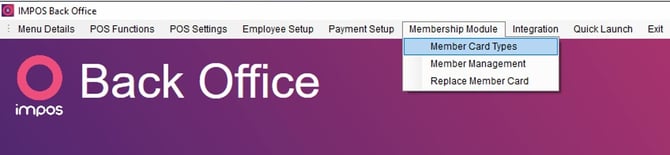
**Using Membership card types**
Membership cards can be used in a number of different ways;
- Points can be added to the card per dollar amount spent at the venue.
- Points can be redeemed at the venue for a set dollar amount per points.
- Discounts can be offered to membership card holders based on their accrued points.
- Set value cards can be sold at and redeemed at the venue, such as Gift Vouchers
- Recharge Cards which encourage members to recharge their cards with additional funds, as a $100 recharge may give $115 credit.
- A price set such as a happy hour can be applied when the member is assigned to the sale
Different card types with different reward schemes are set up in Membership card types
**Adding Membership Card Types in Back Office**
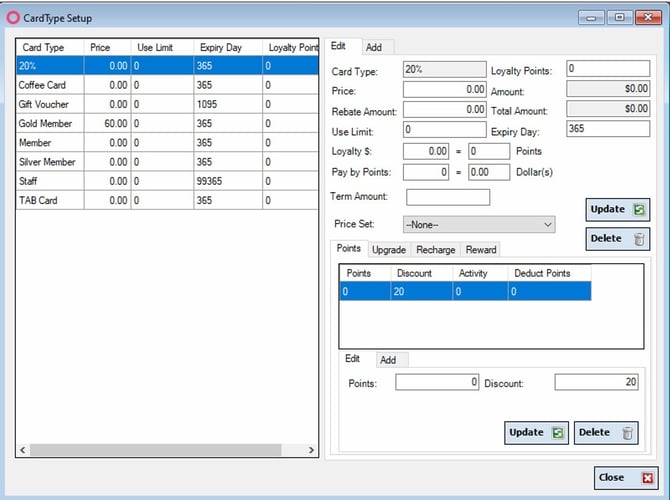
1. Select the ‘Add’ tab.
2. Fill in the required fields as desired.
3. Card type – Add a name for the card type.
4. Loyalty points – Set how many points the card starts with.
5. Price – Set the price of the card.
6. Rebate Amount – Set the amount of extra cash value that is added to the card at purchase, setting this amount at $50 means that the card will be redeemable for $50 more than the purchase price.
7. Use limit – The amount of times a card can be used as a payment before it expires.
8. Expiry day – This sets the amount of days after the card was purchased that the card will expire.
9. Loyalty $ - Sets the amount of points that are accrued per dollar amount spent. If this was set to $50 = 10 points it means that for every $50 spent the card would accrue 10points. It’s best to keep the dollars low to reward members for every transaction.
10. Pay by points – This sets the amount of dollars each point is redeemable for. If this was set to 10 points = 1 dollar it means that the card holder can redeem 1 dollar value for every 10 points currently on the card.
11. Price Set: This determines which price set, if any, is applied when the card is swiped.
12. Points tab – Is used to set discounts that change after a set points level is reached. For example, at 0 points the card entitles the holder to a 10% discount, when the user reaches 200 points the card will then entitle the user to a 20% discount.
13. Upgrade tab - automatically upgrades the card to a higher level of card when the card reaches a set amount of points. For example, when a basic card reaches 500points it will be upgraded to a VIP card. The membership will automatically be moved from one Card Type to another the next time the member is assigned to a sale.
14. Recharge tab - Allows the card holder to be rewarded for recharging their card. If the following card is recharged with $100 the card will be rewarded with an extra $10 dollars credit.
To edit a member card type, select the card type you wish to edit from the list provided, edit the fields as required and click ‘Update’ to save your changes.
To delete a card type, select the card type you wish to delete and select the ‘Delete’ button.
- [How to Connect to your Venue Remotely](https://knowledge.impos.com.au/how-to-connect-to-your-venue-remotely?hsLang=en-au#main-content)
- [How to Connect to your Venue Remotely](https://knowledge.impos.com.au/how-to-connect-to-your-venue-remotely?hsLang=en-au#how-to-connect-to-your-venue-remotely)
- [Impos Back Office and Stock](https://knowledge.impos.com.au/impos-back-office-and-stock?hsLang=en-au#main-content)
- [Stock](https://knowledge.impos.com.au/impos-back-office-and-stock?hsLang=en-au#stock)
- [Back Office](https://knowledge.impos.com.au/impos-back-office-and-stock?hsLang=en-au#back-office)
- [Impos Front Office](https://knowledge.impos.com.au/impos-front-office?hsLang=en-au#main-content)
- [Cashier Reports](https://knowledge.impos.com.au/impos-front-office?hsLang=en-au#cashier-reports)
- [Getting Started with Impos Front Office](https://knowledge.impos.com.au/impos-front-office?hsLang=en-au#getting-started-with-impos-front-office)
- [Order Information](https://knowledge.impos.com.au/impos-front-office?hsLang=en-au#order-information)
- [Table Service](https://knowledge.impos.com.au/impos-front-office?hsLang=en-au#table-service)
- [Storing Order information in Front Office](https://knowledge.impos.com.au/impos-front-office?hsLang=en-au#storing-order-information-in-front-office)
- [Taking Payment](https://knowledge.impos.com.au/impos-front-office?hsLang=en-au#taking-payment)
- [Web Reports](https://knowledge.impos.com.au/impos-front-office?hsLang=en-au#web-reports)
- [More Functions](https://knowledge.impos.com.au/impos-front-office?hsLang=en-au#more-functions)
- [Impos Analytics](https://knowledge.impos.com.au/impos-analytics?hsLang=en-au#main-content)
- [Impos Analytics](https://knowledge.impos.com.au/impos-analytics?hsLang=en-au#impos-analytics)
- [Integrations](https://knowledge.impos.com.au/integrations?hsLang=en-au#main-content)
- [Doshii](https://knowledge.impos.com.au/integrations?hsLang=en-au#doshii)
- [Kitchen & Inventory Management](https://knowledge.impos.com.au/integrations?hsLang=en-au#kitchen-inventory-management)
- [Reservations & Room Charge](https://knowledge.impos.com.au/integrations?hsLang=en-au#reservations-room-charge)
- [Deputy Rostering](https://knowledge.impos.com.au/integrations?hsLang=en-au#deputy-rostering)
- [Promotions & Membership](https://knowledge.impos.com.au/integrations?hsLang=en-au#promotions-membership)
- [Bump Screens](https://knowledge.impos.com.au/integrations?hsLang=en-au#bump-screens)
- [Accounting](https://knowledge.impos.com.au/integrations?hsLang=en-au#accounting)
- [EFTPOS](https://knowledge.impos.com.au/integrations?hsLang=en-au#eftpos)
- [Cinch](https://knowledge.impos.com.au/cinch?hsLang=en-au#main-content)
- [Cinch Web Publishing](https://knowledge.impos.com.au/cinch?hsLang=en-au#cinch-web-publishing)
- [Cinch Basics](https://knowledge.impos.com.au/cinch?hsLang=en-au#cinch-basics)
- [Kiosk](https://knowledge.impos.com.au/kiosk?hsLang=en-au#main-content)
- [Setting Up Kiosk](https://knowledge.impos.com.au/kiosk?hsLang=en-au#setting-up-kiosk)
- [Latest Updates](https://knowledge.impos.com.au/latest-updates?hsLang=en-au#main-content)
- [Release Notes](https://knowledge.impos.com.au/latest-updates?hsLang=en-au#release-notes)
- [Policy Updates](https://knowledge.impos.com.au/latest-updates?hsLang=en-au#policy-updates)
- [FAQs](https://knowledge.impos.com.au/faqs?hsLang=en-au#main-content)
- [FAQs - Front Office](https://knowledge.impos.com.au/faqs?hsLang=en-au#faqs-front-office)
- [FAQs - Back Office](https://knowledge.impos.com.au/faqs?hsLang=en-au#faqs-back-office)
- [FAQs - Hardware eg Printers, Terminals, Tablets, Networking](https://knowledge.impos.com.au/faqs?hsLang=en-au#faqs-hardware-eg-printers-terminals-tablets-networking)
- [FAQs - Onboarding, Installation and Training](https://knowledge.impos.com.au/faqs?hsLang=en-au#faqs-onboarding-installation-and-training)
- [FAQs - Stock](https://knowledge.impos.com.au/faqs?hsLang=en-au#faqs-stock)
- [FAQs - Schools](https://knowledge.impos.com.au/faqs?hsLang=en-au#faqs-schools)
- [Troubleshooting](https://knowledge.impos.com.au/troubleshooting?hsLang=en-au)
[](https://impos.com.au/)
[mailto:email@email.com](mailto:email@email.com)
Copyright © 2026, Impos