---
title: Impos Analytics Stock Reporting Guide
description: Learn how to impos analytics stock reporting guide in Impos Analytics. Get the most from your POS data with powerful reporting tools.
---
[Skip to content](https://knowledge.impos.com.au/hc/en-us/articles/115005932887-impos-analytics-stock-reporting-guide#main-content)
English - Australia
Show submenu for translations
[More support](https://knowledge.impos.com.au/kb-tickets/new?hsLang=en-au)
[](https://impos.com.au)
Open main navigation
Close main navigation
- English - Australia
Show submenu for translations
- [More support](https://knowledge.impos.com.au/kb-tickets/new)
- [visit impos.com.au](https://impos.com.au/)
[visit impos.com.au](https://impos.com.au/)
How can we help you?
- There are no suggestions because the search field is empty.
1. [Impos Knowledge Base](https://knowledge.impos.com.au/?hsLang=en-au)
2. [Impos Analytics](https://knowledge.impos.com.au/impos-analytics?hsLang=en-au)
3. [Impos Analytics](https://knowledge.impos.com.au/impos-analytics?hsLang=en-au#impos-analytics)
25 August 2026
# Impos Analytics Stock Reporting Guide
## This document aims to guide you through some of the stock reports that are available within Impos Analytics
These reports can be found within the Stock Folder on the left side of the Browse page within Impos Analytics.
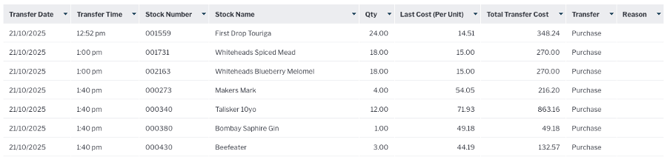
**MIR159 - Stock Transfer Report**
Sales Purchases and adjustments applied to stock items over a period of time. Transaction amounts are listed in Stock units. Positive indicates increase, negative indicates decrease
**Filters:** Store Name, Transaction Date, Stock Name and Transfer Type
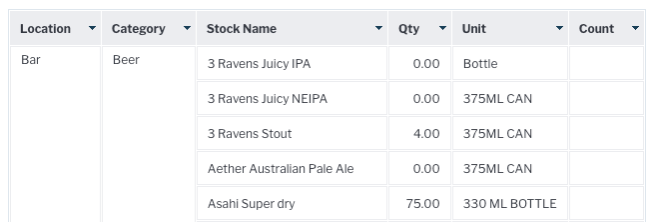
**MIR160 - Stocktake Form**
Empty stocktake form which has current stock items and values as at the last stock synchronise. Can be printed for manual Stocktake.
**
**MIR161 - Stock Report**
Opening, Purchase, Sales and Closing stock. The report compares closing stock with min and max stock levels and changes colours when stock is less than min level
**Filters:** Store Name, Purchase Date, Stock Name and Category
******
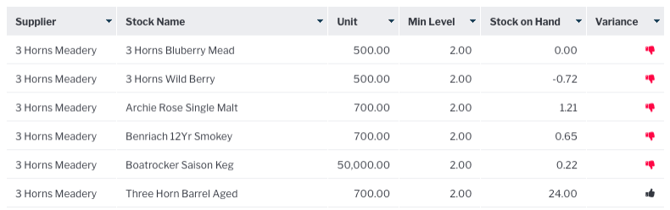
**MIR162 – Stock on Hand vs Min Level Comparison Report**
Compares stock on hand with the minimum level to indicate when stock levels are low.
**Filters:** Stock Name, Stock Variance (alert) and Supplier
**
**MIR163 - Stock Items Sold Group by Supplier**
Stock item qty on hand and qty decremented between the selected date range group by supplier.
**Filters:** Store Name, Stock Name, Supplier Name and Transaction Date.
**
**MIR164 - Stock Cost Variance Report**
Minium, average, maximum and last cost prices of stock items alongside percentage changes.
**Filters:** Store Name, Supplier Name, Stock Name and Date
**
**MIR165 - Stocktake Report**
stocktake variance breakdown detailing the transaction, adjustment, wastage and transfer amounts alongside variance in both volume and cost.
**Filters:** Store Name, Stocktake Identifier and Stock Category
**
**MIR166 - Stock on Hand Report**
Stock amounts as at the last stock synchronise.
**Filters:** Store Name, Location, Category and Stock Name
**
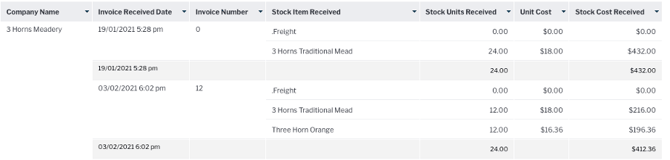
**MIR167 - Purchase Orders Received**
Item level listing of inventory received in the Stock module
**Filters:** Supplier, Invoice date and Invoice Number
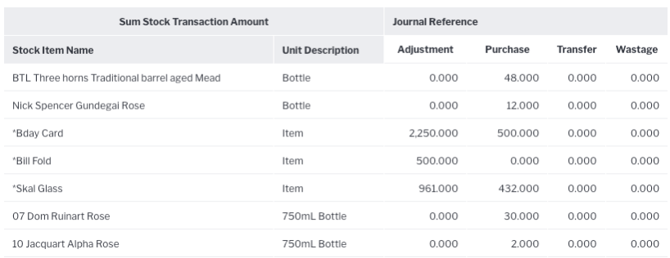
**MIR170 - Movement**
Sales Purchases, and adjustments applied to stock items over a period of time. Transaction amounts are listed in Stock units. Positive indicates an increase, negative indicates decrease
**Filters:** Store Name, Transaction Date/Time, Category
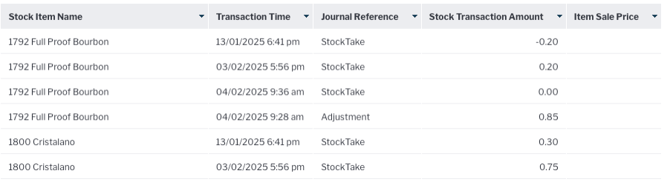
**MIR171 - Journal of Movement**
Stock movement by item at the transaction time level, similar to above but shows when the transactions occurred.
**Filters:** Stock Name, Transaction Date/Time
**MIR173 - Order List Report**
All stock items that are below the min level, indicating that they need to be ordered.
**Filters:** Supplier and Stock Name

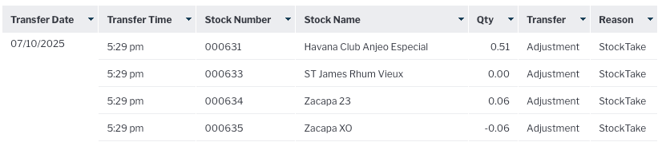
**MIR174 - Adjustment Report**
Details any changes to stock qty due to sales, adjustments, wastage and purchases.
**Filters:** Date
- [How to Connect to your Venue Remotely](https://knowledge.impos.com.au/how-to-connect-to-your-venue-remotely?hsLang=en-au#main-content)
- [How to Connect to your Venue Remotely](https://knowledge.impos.com.au/how-to-connect-to-your-venue-remotely?hsLang=en-au#how-to-connect-to-your-venue-remotely)
- [Impos Back Office and Stock](https://knowledge.impos.com.au/impos-back-office-and-stock?hsLang=en-au#main-content)
- [Stock](https://knowledge.impos.com.au/impos-back-office-and-stock?hsLang=en-au#stock)
- [Back Office](https://knowledge.impos.com.au/impos-back-office-and-stock?hsLang=en-au#back-office)
- [Impos Front Office](https://knowledge.impos.com.au/impos-front-office?hsLang=en-au#main-content)
- [Cashier Reports](https://knowledge.impos.com.au/impos-front-office?hsLang=en-au#cashier-reports)
- [Getting Started with Impos Front Office](https://knowledge.impos.com.au/impos-front-office?hsLang=en-au#getting-started-with-impos-front-office)
- [Order Information](https://knowledge.impos.com.au/impos-front-office?hsLang=en-au#order-information)
- [Table Service](https://knowledge.impos.com.au/impos-front-office?hsLang=en-au#table-service)
- [Storing Order information in Front Office](https://knowledge.impos.com.au/impos-front-office?hsLang=en-au#storing-order-information-in-front-office)
- [Taking Payment](https://knowledge.impos.com.au/impos-front-office?hsLang=en-au#taking-payment)
- [Web Reports](https://knowledge.impos.com.au/impos-front-office?hsLang=en-au#web-reports)
- [More Functions](https://knowledge.impos.com.au/impos-front-office?hsLang=en-au#more-functions)
- [Impos Analytics](https://knowledge.impos.com.au/impos-analytics?hsLang=en-au#main-content)
- [Impos Analytics](https://knowledge.impos.com.au/impos-analytics?hsLang=en-au#impos-analytics)
- [Integrations](https://knowledge.impos.com.au/integrations?hsLang=en-au#main-content)
- [Doshii](https://knowledge.impos.com.au/integrations?hsLang=en-au#doshii)
- [Kitchen & Inventory Management](https://knowledge.impos.com.au/integrations?hsLang=en-au#kitchen-inventory-management)
- [Reservations & Room Charge](https://knowledge.impos.com.au/integrations?hsLang=en-au#reservations-room-charge)
- [Deputy Rostering](https://knowledge.impos.com.au/integrations?hsLang=en-au#deputy-rostering)
- [Promotions & Membership](https://knowledge.impos.com.au/integrations?hsLang=en-au#promotions-membership)
- [Bump Screens](https://knowledge.impos.com.au/integrations?hsLang=en-au#bump-screens)
- [Accounting](https://knowledge.impos.com.au/integrations?hsLang=en-au#accounting)
- [EFTPOS](https://knowledge.impos.com.au/integrations?hsLang=en-au#eftpos)
- [Cinch](https://knowledge.impos.com.au/cinch?hsLang=en-au#main-content)
- [Cinch Web Publishing](https://knowledge.impos.com.au/cinch?hsLang=en-au#cinch-web-publishing)
- [Cinch Basics](https://knowledge.impos.com.au/cinch?hsLang=en-au#cinch-basics)
- [Kiosk](https://knowledge.impos.com.au/kiosk?hsLang=en-au#main-content)
- [Setting Up Kiosk](https://knowledge.impos.com.au/kiosk?hsLang=en-au#setting-up-kiosk)
- [Latest Updates](https://knowledge.impos.com.au/latest-updates?hsLang=en-au#main-content)
- [Release Notes](https://knowledge.impos.com.au/latest-updates?hsLang=en-au#release-notes)
- [Policy Updates](https://knowledge.impos.com.au/latest-updates?hsLang=en-au#policy-updates)
- [FAQs](https://knowledge.impos.com.au/faqs?hsLang=en-au#main-content)
- [FAQs - Front Office](https://knowledge.impos.com.au/faqs?hsLang=en-au#faqs-front-office)
- [FAQs - Back Office](https://knowledge.impos.com.au/faqs?hsLang=en-au#faqs-back-office)
- [FAQs - Hardware eg Printers, Terminals, Tablets, Networking](https://knowledge.impos.com.au/faqs?hsLang=en-au#faqs-hardware-eg-printers-terminals-tablets-networking)
- [FAQs - Onboarding, Installation and Training](https://knowledge.impos.com.au/faqs?hsLang=en-au#faqs-onboarding-installation-and-training)
- [FAQs - Stock](https://knowledge.impos.com.au/faqs?hsLang=en-au#faqs-stock)
- [FAQs - Schools](https://knowledge.impos.com.au/faqs?hsLang=en-au#faqs-schools)
- [Troubleshooting](https://knowledge.impos.com.au/troubleshooting?hsLang=en-au)
[](https://impos.com.au/)
[mailto:email@email.com](mailto:email@email.com)
Copyright © 2026, Impos