---
title: Ebet X ImPOS integration
description: "Ebet\nGaming \nTiering"
---
[Skip to content](https://knowledge.impos.com.au/ebet-x-impos-integration-#main-content)
English - Australia
Show submenu for translations
[More support](https://knowledge.impos.com.au/kb-tickets/new?hsLang=en-au)
[](https://impos.com.au)
Open main navigation
Close main navigation
- English - Australia
Show submenu for translations
- [More support](https://knowledge.impos.com.au/kb-tickets/new)
- [visit impos.com.au](https://impos.com.au/)
[visit impos.com.au](https://impos.com.au/)
How can we help you?
- There are no suggestions because the search field is empty.
1. [Impos Knowledge Base](https://knowledge.impos.com.au/?hsLang=en-au)
2. [Integrations](https://knowledge.impos.com.au/integrations?hsLang=en-au)
3. [Promotions & Membership](https://knowledge.impos.com.au/integrations?hsLang=en-au#promotions-membership)
9 September 2026
# Ebet X ImPOS integration
**1. Overview**
eBet is a gaming platform that provides gaming machines to venues across Australia. Patrons can earn loyalty points through gaming activity and redeem them at the POS for eligible food, beverages and other benefits.
The eBet integration with Impos allows venues to recognise members at the POS, check their points balance, accrue and redeem points, and apply membership benefits.
The integration also supports membership tiers, allowing eBet tiers to be mapped to Impos Card Types with different pricing, discounts and loyalty benefits.
**2. Purpose**
The eBet and Impos integration allows patrons to identify themselves at the Point of Sale using their eBet member card.
Members can use their membership to:
• Check their current eBet points balance.
• Redeem points towards purchases.
• Earn points when making purchases using cash or card.
• Receive discounts and other benefits associated with their membership tier.
**3. System Requirements**
The following are required to use the eBet integration:
• Impos version 6.61 or later
• Active internet connection
• MSR or Barcode Scanner
**4. Front Office Workflow**
The typical workflow for an eBet member transaction is:
**Step 1 – Identify the Member**
Scan the member's eBet card at the POS.
**Step 2 – Retrieve Member Information**
Impos checks the member and retrieves the latest available information from eBet.
**Step 3 – Determine Membership Tier**
If tiering is configured, Impos identifies the member's current eBet tier and assigns the corresponding Impos Card Type.
**Step 4 – Apply Benefits**
The Card Type determines the applicable: • Pricing • Discounts • Point accrual rules • Other membership benefits
**Step 5 – Complete the Purchase**
The member can either: • Pay normally and accrue points, or • Use their available points through Member Payment.
**Step 6 – Update Points**
The relevant transaction information is sent to eBet and the member's points balance is updated.
**5. Membership Setup**
eBet uses the membership model in Impos. By default, members retrieved from eBet are assigned to the eBet Card Type in Impos if membership tiering is not configured in eBet.
If membership tiering is implemented in eBet, Impos can also support and map the different membership tiers accordingly
eBet membership can include different loyalty tiers. For example:
• Bronze
• Silver
• Gold
Each tier can have different benefits.
Impos supports mapping these eBet membership tiers to separate Impos Card Types. This allows the venue to configure different pricing, discounts, point accrual rates and other benefits for each tier.
Example:
| **eBet Tier** | **Impos Card Type** | **Benefits** |
| --- | --- | --- |
| Gold | Gold | Gold pricing, discounts and loyalty benefits |
| Silver | Silver | Silver pricing, discounts and loyalty benefits |
| Bronze | Bronze | Bronze pricing, discounts and loyalty benefits |
When a card is scanned and member recognised, Impos retrieves their current membership tier from eBet and assigns the member to the corresponding Impos Card Type.
This ensures the correct benefits are applied at the POS.
**6. Configuring Membership Tiers in Impos Back Office**
**Step 1: Open Card Type Setup**
1\. Open Impos **Back Office**.
2\. Navigate to **Card Type Setup**.
**Step 2: Create a Card Type for Each eBet Tier**
Create an Impos Card Type for each membership tier used by eBet.
The Card Type name should match the corresponding eBet tier.
For example:
• Gold
• Silver
• Bronze
**Integration Partner**
Set the Integration Partner to eBet
This identifies the Card Type as being associated with the eBet membership system.
**External Card ID**
Enter the corresponding eBet tier ID in the External Card ID field.
The External Card ID allows Impos to match the eBet membership tier with the appropriate Impos Card Type.
Example:
| **eBet Tier** | **eBet Tier ID** | **Impos Card Type** |
| --- | --- | --- |
| GOld | 3 | Gold |
| Silver | 2 | Silver |
| Bronze | 1 | Bronze |
The exact tier IDs should be obtained from the eBet configuration for the venue.
**7. Configuring Tier Benefits**
Once the Card Types have been created, configure the benefits that should apply to each membership tier
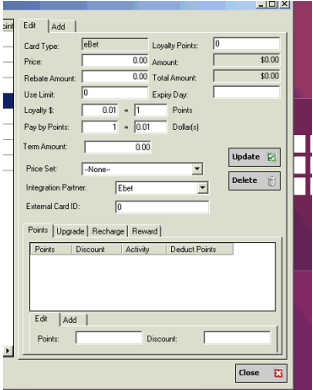
Depending on the venue's requirements, these may include:
- **Pricing rules**
- **Discounts**
- **Point accrual rates**
- **Point redemption rates**
Each Card Type can be configured independently, allowing different benefits to be provided to different membership tiers.
For example, a Gold member could receive a higher discount or different point accrual rate than a Bronze member.
**8. Automatic Card Type Creation**
If an eBet membership tier is received by Impos and there is no matching Card Type configured, Impos can automatically create a Card Type for that tier.
This may occur when:
• A new membership tier is introduced in eBet.
• A tier has not yet been configured in Impos.
• A new tier is received for the first time.
Once the Card Type has been created, it can be reviewed and configured in:
**Back Office → Card Type Setup**
The venue can then configure the appropriate:
- Discounts
- Pricing rules
- Point accrual settings
- Point redemption settings
- Other membership benefits
**9. Assigning a Member to a Check**
Once an eBet member has been recognised, the member can be assigned to the
current check in Impos.
The member's Card Type and associated benefits will be applied to the transaction.
The member can then use their points through the Member Payment function, where
applicable.
**10. Point Accrual**
When an eBet member is assigned to a check and the check is completed, Impos sends
the relevant transaction information to eBet.
This includes:
• Total transaction spend
• Relevant member information
eBet then processes the transaction and calculates the points earned by the member.
**11. Point Accrual Rate**
The number of points earned is determined by the member's Card Type configuration in
ebet as well as Impos.
The configured $ to Points ratio determines how spending is converted into points.
For example, if the configured ratio is:
**$1 spent = 1 point**
A $50 eligible purchase would result in 50 points being accrued.
After a successful accrual, Impos updates the member's local points balance.
**12. Point Redemption**
Members can redeem their eBet points towards purchases using the **Member Payment**
function.
Before processing the payment, Impos checks the member's current points balance to
ensure there are sufficient points available.
**13. Partial Payments**
Members can use points to pay for part of a transaction and pay the remaining balance
using another payment method, where supported.
For example:
• Total check: $50
• Points redemption: $30
• Remaining balance: $20
The member can redeem the required points and pay the remaining $20 using another
payment method.
**14. Refunds and Voided Member Payments**
If a Member Payment made using eBet points is subsequently voided, Impos performs
the appropriate point adjustment with eBet.
The points associated with the voided redemption are returned to the member's
available balance.
This ensures that the member's points balance remains consistent with the completed
transactions.
- [How to Connect to your Venue Remotely](https://knowledge.impos.com.au/how-to-connect-to-your-venue-remotely?hsLang=en-au#main-content)
- [How to Connect to your Venue Remotely](https://knowledge.impos.com.au/how-to-connect-to-your-venue-remotely?hsLang=en-au#how-to-connect-to-your-venue-remotely)
- [Impos Back Office and Stock](https://knowledge.impos.com.au/impos-back-office-and-stock?hsLang=en-au#main-content)
- [Stock](https://knowledge.impos.com.au/impos-back-office-and-stock?hsLang=en-au#stock)
- [Back Office](https://knowledge.impos.com.au/impos-back-office-and-stock?hsLang=en-au#back-office)
- [Impos Front Office](https://knowledge.impos.com.au/impos-front-office?hsLang=en-au#main-content)
- [Cashier Reports](https://knowledge.impos.com.au/impos-front-office?hsLang=en-au#cashier-reports)
- [Getting Started with Impos Front Office](https://knowledge.impos.com.au/impos-front-office?hsLang=en-au#getting-started-with-impos-front-office)
- [Order Information](https://knowledge.impos.com.au/impos-front-office?hsLang=en-au#order-information)
- [Table Service](https://knowledge.impos.com.au/impos-front-office?hsLang=en-au#table-service)
- [Storing Order information in Front Office](https://knowledge.impos.com.au/impos-front-office?hsLang=en-au#storing-order-information-in-front-office)
- [Taking Payment](https://knowledge.impos.com.au/impos-front-office?hsLang=en-au#taking-payment)
- [Web Reports](https://knowledge.impos.com.au/impos-front-office?hsLang=en-au#web-reports)
- [More Functions](https://knowledge.impos.com.au/impos-front-office?hsLang=en-au#more-functions)
- [Impos Analytics](https://knowledge.impos.com.au/impos-analytics?hsLang=en-au#main-content)
- [Impos Analytics](https://knowledge.impos.com.au/impos-analytics?hsLang=en-au#impos-analytics)
- [Integrations](https://knowledge.impos.com.au/integrations?hsLang=en-au#main-content)
- [Doshii](https://knowledge.impos.com.au/integrations?hsLang=en-au#doshii)
- [Kitchen & Inventory Management](https://knowledge.impos.com.au/integrations?hsLang=en-au#kitchen-inventory-management)
- [Reservations & Room Charge](https://knowledge.impos.com.au/integrations?hsLang=en-au#reservations-room-charge)
- [Deputy Rostering](https://knowledge.impos.com.au/integrations?hsLang=en-au#deputy-rostering)
- [Promotions & Membership](https://knowledge.impos.com.au/integrations?hsLang=en-au#promotions-membership)
- [Bump Screens](https://knowledge.impos.com.au/integrations?hsLang=en-au#bump-screens)
- [Accounting](https://knowledge.impos.com.au/integrations?hsLang=en-au#accounting)
- [EFTPOS](https://knowledge.impos.com.au/integrations?hsLang=en-au#eftpos)
- [Cinch](https://knowledge.impos.com.au/cinch?hsLang=en-au#main-content)
- [Cinch Web Publishing](https://knowledge.impos.com.au/cinch?hsLang=en-au#cinch-web-publishing)
- [Cinch Basics](https://knowledge.impos.com.au/cinch?hsLang=en-au#cinch-basics)
- [Kiosk](https://knowledge.impos.com.au/kiosk?hsLang=en-au#main-content)
- [Setting Up Kiosk](https://knowledge.impos.com.au/kiosk?hsLang=en-au#setting-up-kiosk)
- [Latest Updates](https://knowledge.impos.com.au/latest-updates?hsLang=en-au#main-content)
- [Release Notes](https://knowledge.impos.com.au/latest-updates?hsLang=en-au#release-notes)
- [Policy Updates](https://knowledge.impos.com.au/latest-updates?hsLang=en-au#policy-updates)
- [FAQs](https://knowledge.impos.com.au/faqs?hsLang=en-au#main-content)
- [FAQs - Front Office](https://knowledge.impos.com.au/faqs?hsLang=en-au#faqs-front-office)
- [FAQs - Back Office](https://knowledge.impos.com.au/faqs?hsLang=en-au#faqs-back-office)
- [FAQs - Hardware eg Printers, Terminals, Tablets, Networking](https://knowledge.impos.com.au/faqs?hsLang=en-au#faqs-hardware-eg-printers-terminals-tablets-networking)
- [FAQs - Onboarding, Installation and Training](https://knowledge.impos.com.au/faqs?hsLang=en-au#faqs-onboarding-installation-and-training)
- [FAQs - Stock](https://knowledge.impos.com.au/faqs?hsLang=en-au#faqs-stock)
- [FAQs - Schools](https://knowledge.impos.com.au/faqs?hsLang=en-au#faqs-schools)
- [Cloud Based Management](https://knowledge.impos.com.au/cloud-based-management?hsLang=en-au#main-content)
- [Impos Cloud API](https://knowledge.impos.com.au/cloud-based-management?hsLang=en-au#impos-cloud-api)
[](https://impos.com.au/)
[mailto:email@email.com](mailto:email@email.com)
Copyright © 2026, Impos